
Passbook & expense tracker
All your bank statements, in one passbook.
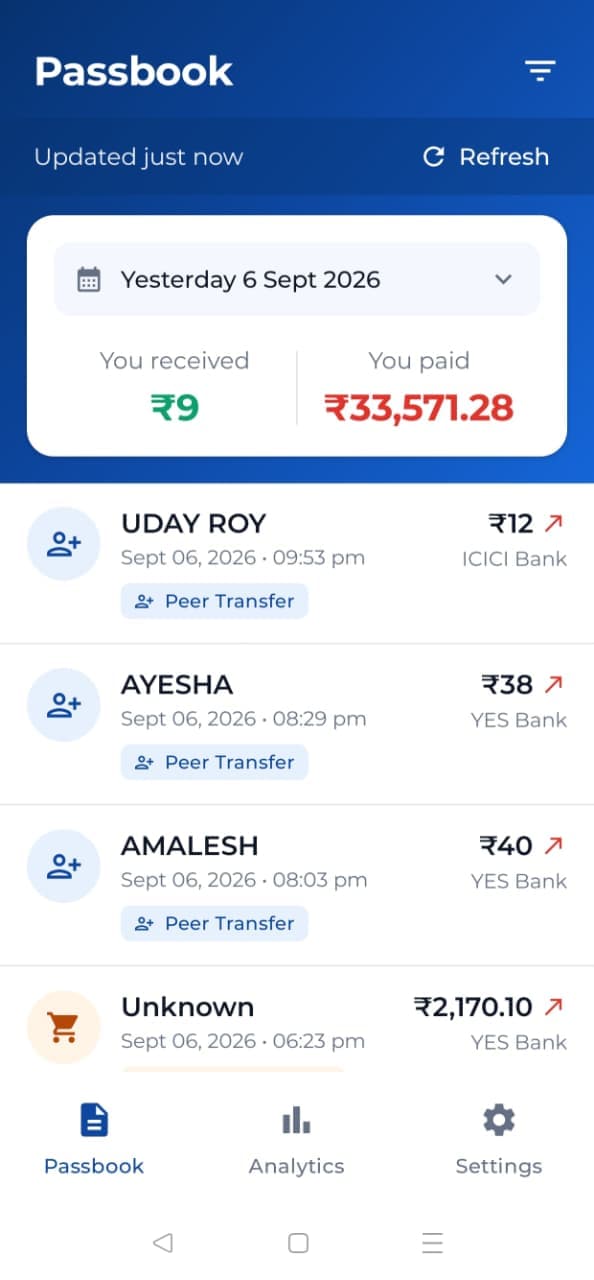
Passbook One reads the SMS alerts your banks send you and turns them into a single passbook statement — everything you received and everything you paid, across every account.
Your messages never leave your phone.
Reads the alerts from these banks, and many more










All bank names and logos are the trademarks of their respective owners. They are shown to indicate supported SMS alerts only, and do not imply any endorsement, sponsorship or partnership.
Features
A passbook that keeps itself up to date
Everything below runs off the alerts your bank already sends you. There is nothing to enter and nothing to reconcile.
Captures itself
Every bank alert that arrives becomes a transaction. You never type an entry.
Received and paid
Two running totals for whichever period you are looking at, side by side.
Any period you need
Today, yesterday, last 7 days, this month, this year, or a custom date range.
Categories that learn
Food, Fuel, Bills, Salary and more. Correct a shop once and it stays corrected.
Split by payment type
See UPI, credit card, debit card and direct bank movement on their own.
Opens without network
Your passbook is stored on the device, so it is ready the moment you open it.
Read aloud
New transactions are announced in the language the app is set to.
Told immediately
A notification the moment a transaction is detected.
English and Hindi
More Indian languages are on the way.
Twelve months on day one
Your first run imports a year of history from your messages.
How it works
Three steps, then it is on its own
Setting up takes under a minute. After that you only open the app to look.
Step 1: Sign in with your number
One mobile number, one passbook. No forms, no documents, no bank login of any kind.
Step 2: Allow SMS access
Passbook One needs to read the alerts your banks send you. Nothing else on your phone is touched.
Step 3: Your passbook builds itself
The last twelve months are read in, sorted and categorised. After that it keeps up on its own.
Filters and detail
Narrow it down to exactly what you want to see
Pick a period, pick a payment type, and the totals move with you.
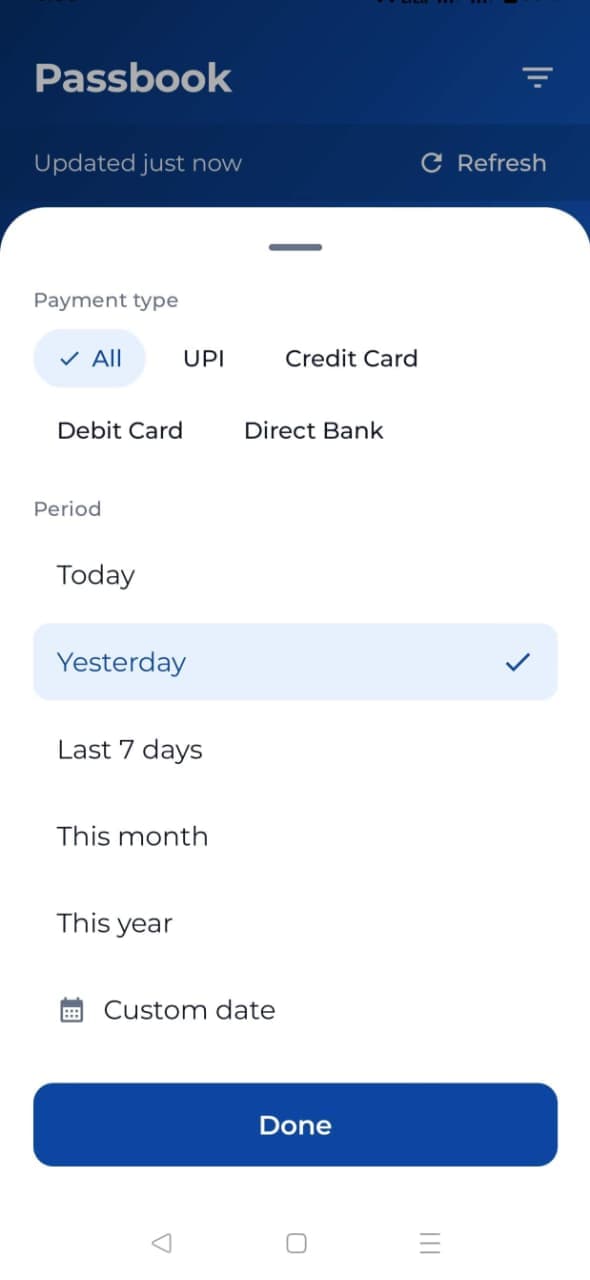
A period for every question
Today, this month, this year, or a custom range when you need the exact fortnight. Whichever you choose, the two totals at the top recalculate.
- Today
- Yesterday
- Last 7 days
- This month
- This year
- Custom range
Then narrow by how it was paid
- UPI
- Credit Card
- Debit Card
- Direct Bank
This month
- You received
- ₹1,24,500.00
- You paid
- ₹40,726.08
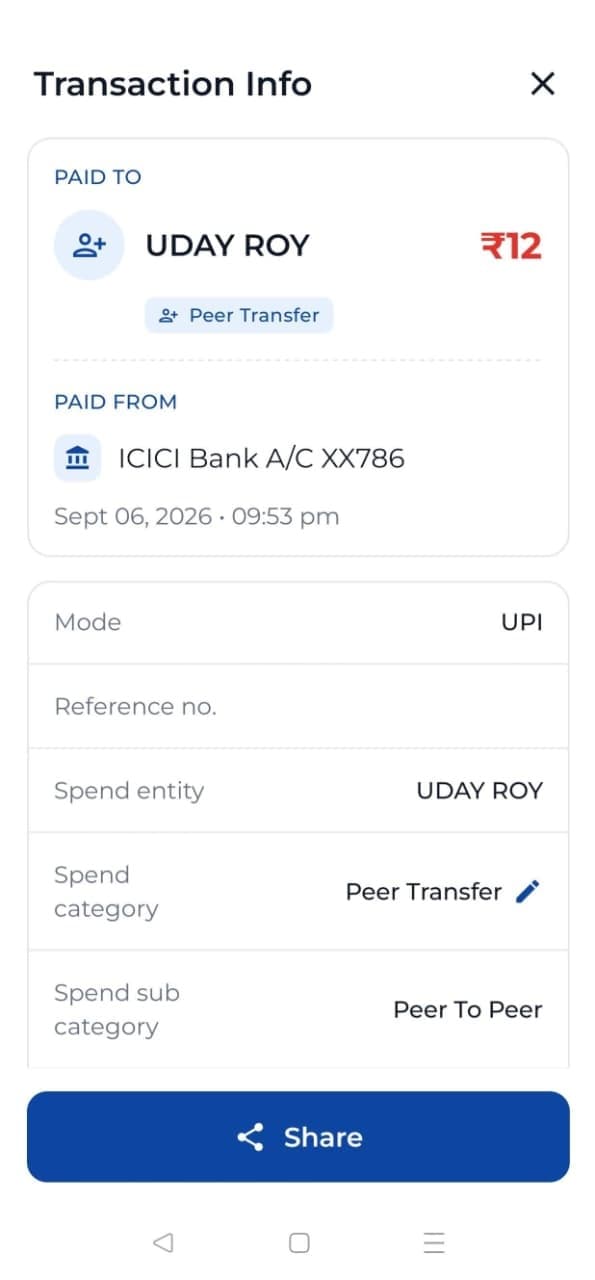
Open any entry and the whole story is there
Every transaction keeps what the bank told you, laid out properly instead of buried in a message.
Payee or payer. Who the money went to, or came from
Bank and account. The bank, with the account or card masked
Mode. UPI, credit card, debit card or direct bank
Reference number. The bank's own reference for the entry
Category. Category and sub-category, set automatically
Counterparty type. A person, a merchant, or your own account
Original SMS. The alert it was read from, kept on the device
And a share button, for when someone asks you to prove it.
Categories that stop being wrong
Every entry is sorted automatically into Peer Transfer, Food, Groceries, Shopping, Bills, Transport, Fuel, ATM & Cash and Salary. Fix a shop once and every future payment to it is filed the same way.
What happens to your messages, precisely
This is the part most apps keep vague, so here it is in plain terms. Passbook One needs to read your bank alerts to build a passbook. That reading happens on your phone, and the words in your messages stay there.
Matched on your phone
Your messages are read and parsed on the device itself. Nothing is sent anywhere to be understood.
Only the parsed details are backed up
Amount, bank, counterparty, date and category go to your account, so your passbook survives a lost phone.
Message text is never uploaded
The text of your messages is never uploaded and never shared. Not with us, not with anyone.
Non-bank messages are ignored
If a message is not a bank alert, Passbook One skips it. It is not read into the passbook and not stored.
Passbook One is a passbook and an expense tracker. It has no payment permissions and no access to your accounts — it cannot move money, and it never will.
In your language
Passbook One is available in English and Hindi today. More Indian languages are on the way.
Voice announcements follow whichever language the app is set to, so a new transaction is read out the way you would say it.
English
Available now
हिन्दी
Available now
More Indian languages
Coming soon
FAQ
Questions people ask first
Does it work without internet?
Yes. Your passbook is stored on your phone, so it opens instantly and you can browse every period and filter with no network at all. A connection is only needed to back up the parsed transaction details to your account.
Which banks are supported?
SBI, HDFC, ICICI, Axis, Kotak, PNB, Bank of Baroda, Canara, IDFC FIRST, Yes Bank and many more. If your bank sends you a transaction alert by SMS, Passbook One will almost certainly read it. New alert formats are added as we come across them.
Do you read my personal messages?
No. Messages are read and matched entirely on your phone, and anything that is not a bank alert is ignored. The text of your messages is never uploaded and never shared. Only the parsed details of a transaction, such as amount, bank, counterparty, date and category, are backed up to your account.
Are credit cards included?
Yes. Credit card spends are captured alongside UPI, debit card and direct bank transactions, and you can filter to just credit card to see the month on its own. The card number is shown masked, exactly as your bank sends it.
Is it free?
Yes. Passbook One will be free to download and use. It is a passbook and expense tracker, not a payment app, so there is nothing to pay for and no transaction ever passes through it.
Can it move money or make payments?
No, and it never will. Passbook One only reads the alerts your bank has already sent you. It has no access to your accounts, no payment permissions and no way to move a rupee.
Still unsure about something? bongdigitalmedia@gmail.com